How Much RAM Do I Need for Cybersecurity? The Honest Breakdown
If you ask five different people how much RAM you need for cybersecurity, you'll probably get five different answers. Some will say 8GB is completely fine. Others will insist you need 32GB or your laptop will crash. The truth? The honest answer depends on what you're actually running.
The question isn't "how much RAM does cybersecurity need?" The question you should be asking is: "How much RAM does MY cybersecurity workload need at the exact same time?"
Unlike video editing or gaming, cybersecurity isn't about running one massive program that hogs all your resources. It's about multitasking. You are running an operating system, running a virtual machine inside that operating system, running a web browser with twenty tabs open, and probably running network scanning tools in the background. That is where your RAM disappears.
Before you run to Computer Village in Lagos or a mall in Abuja to buy a new machine, let's break down exactly how RAM affects cybersecurity work and what amount makes sense for your stage.
Why RAM Matters More in Cybersecurity Than Most Fields
If you're studying frontend web development, you mostly need a code editor and a browser. But cybersecurity is different because cybersecurity almost always involves running Virtual Machines (VMs).
A virtual machine is basically a computer inside your computer. When you run a Kali Linux VM on a Windows laptop, your physical laptop (the "host") has to carve out a dedicated chunk of its own RAM and hand it over to the VM (the "guest"). That RAM is gone. Your host OS cannot touch it until you shut the VM down.
Let's paint a picture:
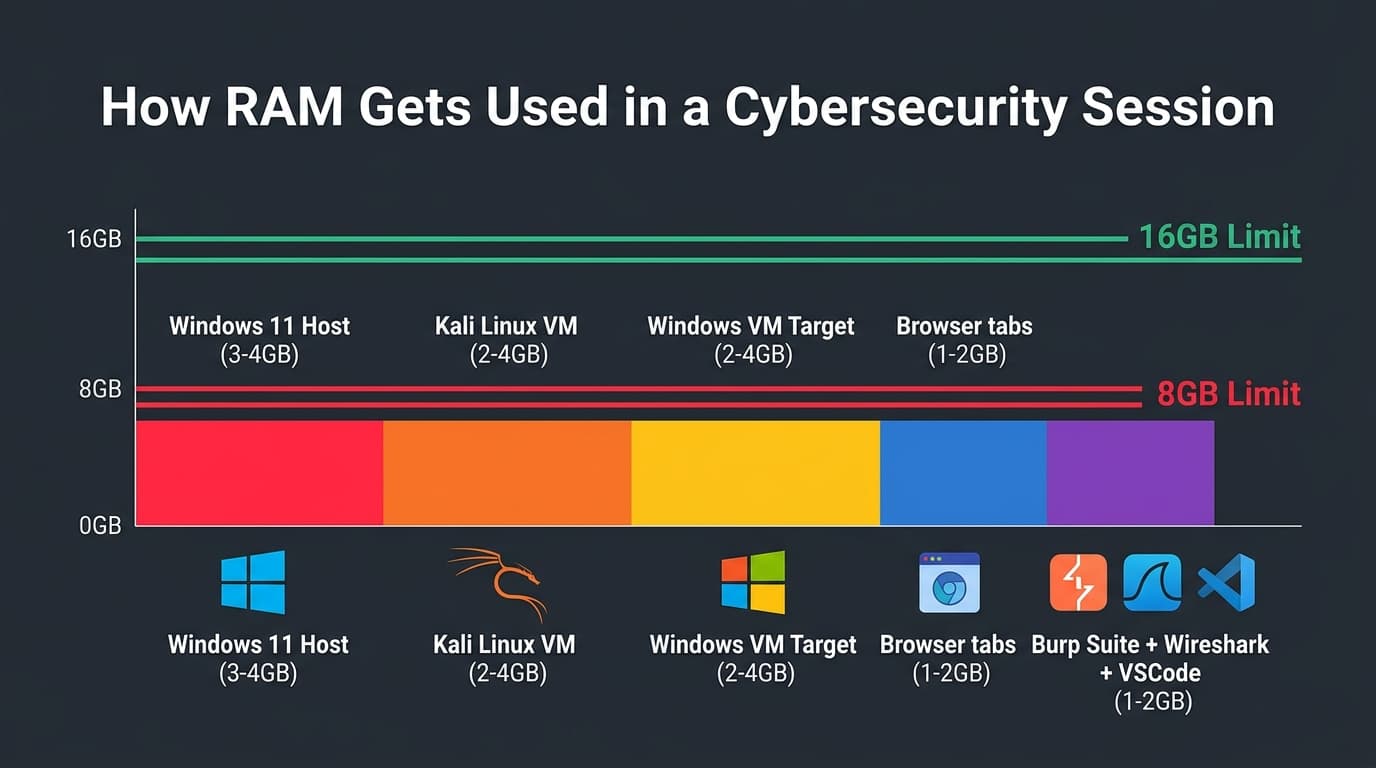
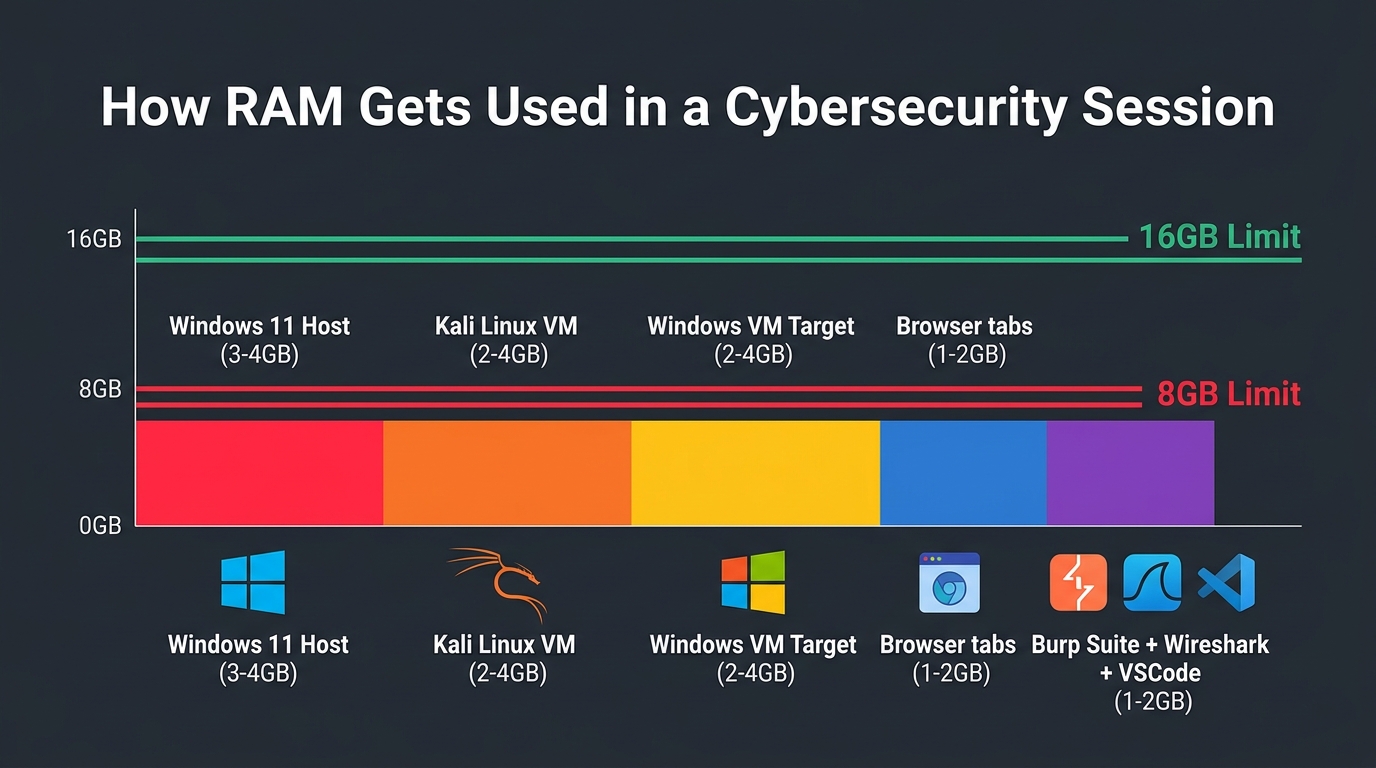
- Your Windows 11 host operating system alone needs about 3–4GB of RAM just to stay awake and run smoothly.
- Running Kali Linux in a VM typically takes another 2–4GB of RAM just for the VM itself to function without freezing.
- If you decide to practice attacking a vulnerable Windows machine, you'll need to spin up a Windows VM — that's another 2–4GB gone.
- Add your web browser with 20 tabs open (because you're constantly reading documentation): another 1–2GB.
- Add Burp Suite, Wireshark, and VSCode running simultaneously: even more RAM disappears.
If you have an 8GB laptop, you can see how you'll hit a wall very quickly. You can make it work as a beginner with strict discipline, but you'll constantly be managing your limits. On 16GB, you can comfortably run 1–2 VMs alongside your tools. On 32GB, you can run multiple VMs comfortably with no real constraints.
If you're curious about the CPU and storage side of things, check out our comprehensive guide on what other specifications matter for a cybersecurity laptop.
What a Typical Cybersecurity Session Actually Consumes
To give you a clearer picture, here is a realistic workload breakdown. These numbers are approximate — actual usage varies based on your specific configuration and how intensely you are pushing your tools.
| Workload | RAM Consumed (Approx.) |
|---|---|
| Windows 11 host OS (idle) | 3–4 GB |
| Browser with 10–15 tabs | 1–2 GB |
| Kali Linux VM | 2–4 GB |
| Windows 10/11 VM (target machine) | 2–4 GB |
| Burp Suite Community Edition | 0.5–1 GB |
| Wireshark (active packet capture) | 0.5–1 GB |
| VS Code + extensions | 0.5–1 GB |
| Docker containers (small web apps) | 0.5–2 GB |
What Happens When You Run Out of RAM?
So, what actually happens if your system needs 12GB of RAM but you only have 8GB installed? Your laptop doesn't just explode, but it does something arguably more frustrating: it starts paging or swapping.
When RAM is full, the operating system takes data it isn't actively using and temporarily moves it to your hard drive (creating "virtual memory"). When it needs that data again, it swaps it back.
Here is the problem: even the fastest SSDs are thousands of times slower than RAM. If you are using an old-school spinning HDD (which you absolutely should not be), this swapping process is catastrophic — everything slows to a crawl. On a modern SSD, it's less painful, but still bad. Your VMs become sluggish, your security tools lag, and your laptop fans will spin up like a jet engine. If you want to dive deeper into how this affects VMs, read our guide on how RAM interacts with virtual machine performance.
8GB RAM — Can It Actually Work?
Let's be completely honest: yes, 8GB can work, but with major caveats. If you are a genuine beginner starting out with TryHackMe or basic web application pentesting, you can survive on 8GB.
However, you can only run ONE lightweight virtual machine at a time. You cannot run Kali Linux and a vulnerable Windows target VM simultaneously. You also need to practice extreme discipline: close all unnecessary browser tabs, exit Spotify, shut down background chat apps, and allocate no more than 3–4GB of RAM to your single VM.
Here is where it gets risky: if you buy an 8GB laptop where the RAM is soldered to the motherboard (meaning you can't upgrade it later), you are trapping yourself. As your skills grow, your workload will grow, and you'll eventually have to buy an entirely new laptop. If you're buying an 8GB laptop in Nigeria today, make absolutely sure it has an empty slot for an upgrade down the line.
16GB RAM — The Realistic Minimum for Active Learners
If you want to actually enjoy learning cybersecurity without constantly worrying about your task manager, 16GB is the realistic sweet spot. This is the amount of memory that gives you breathing room.
With 16GB, you can comfortably run your host operating system, a Kali Linux VM (4GB), a target vulnerable VM (4GB), and still have plenty of memory left over for a browser loaded with research tabs and note-taking apps. Most professional cybersecurity training courses and certifications like OSCP assume you have at least 16GB of RAM.
32GB RAM — When Is It Actually Necessary?
You'll often see professionals online with 32GB or 64GB setups. But do you, a beginner or intermediate learner, actually need 32GB? Usually, no.
However, 32GB becomes genuinely necessary when you move into advanced territory:
- Complex Active Directory Labs: Running a Windows Server Domain Controller plus two or three Windows 10 client VMs simultaneously to practice network pivoting and lateral movement.
- Malware Analysis: Running isolated, nested virtual environments to safely analyze malware.
- Digital Forensics: Analyzing massive memory dumps or raw disk images that need to be loaded into memory.
- Heavy Docker Usage: Running complex microservice architectures alongside your standard testing VMs.
Most learners do NOT need 32GB to start. But if you have the budget and find a good deal, it future-proofs your machine for years to come.
The Thing Most Guides Don't Mention: Soldered vs Upgradeable RAM
This is arguably the most important section of this article. A lot of modern laptops — especially thin-and-light models — have their RAM soldered directly to the motherboard.
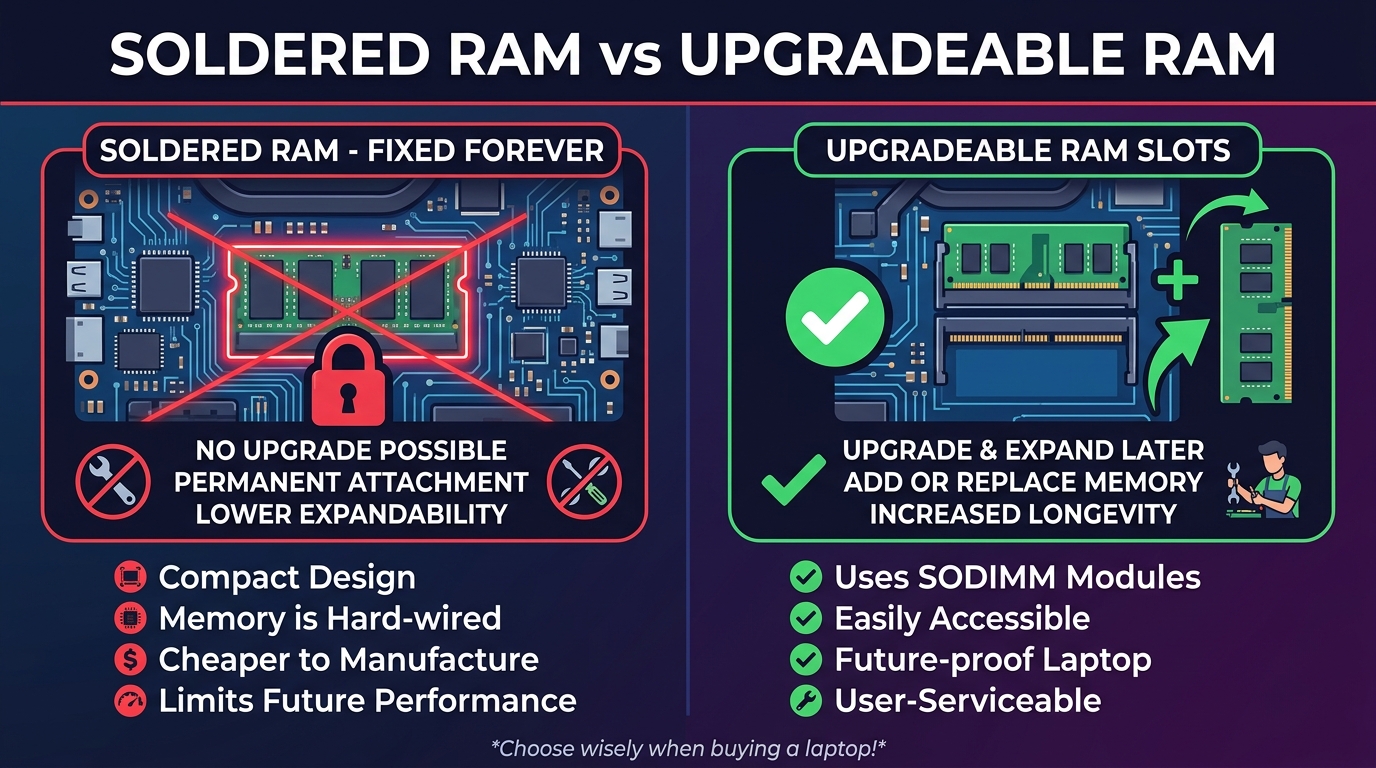
Soldered RAM cannot be upgraded. Ever. What you buy on day one is what you are stuck with until the laptop dies.
If you are buying a 16GB soldered laptop, that is generally fine because 16GB will remain sufficient for a long time. But buying an 8GB soldered laptop for cybersecurity is a massive risk. Within a year, you will likely outgrow it, and you'll have no choice but to sell it at a loss and buy a new one.
On the flip side, laptops with upgradeable RAM (SODIMM slots) are a lifesaver. You can buy a cheaper 8GB laptop today, save up some money, and drop in another 8GB stick next year. When shopping for cybersecurity-capable laptops in Nigeria, this flexibility is crucial because dropping ₦800,000+ on a high-spec laptop all at once isn't always feasible.
How to check: Always Google the exact model number of the laptop followed by "service manual" or "RAM upgrade Notebookcheck." Do not just trust the salesperson at the shop — verify it yourself.
Dual-Channel vs Single-Channel: A Real-World Difference
Here is another technical detail that heavily impacts virtual machine performance: RAM channels.
If your laptop has 16GB of RAM, it can either be configured as one single 16GB stick (single-channel) or two 8GB sticks (dual-channel). Dual-channel memory allows your CPU to access two sticks of RAM simultaneously, effectively doubling the data transfer bandwidth between memory and processor.
In regular office work, you might not notice the difference. But in cybersecurity, where you are running heavy VMs and moving large amounts of data between the host and guest OS, dual-channel RAM performs noticeably better. It makes the entire system feel snappier and reduces lag during intensive VM sessions.
If you are upgrading your laptop by adding a second stick of RAM, always try to match the capacity and speed of the existing stick to ensure it runs properly in dual-channel mode.
What to Check Before Buying
Here is your ultimate RAM checklist before purchasing a laptop for cybersecurity:
- Assess your current stage: Are you just doing TryHackMe in a browser? 8GB might be fine for now. Are you setting up your own lab? You need 16GB.
- Check upgradeability: Is the RAM soldered? If yes, never buy an 8GB model. If no, you have flexibility.
- Look at the total cost: In the Nigerian market, sometimes it's cheaper to buy an 8GB upgradeable laptop and pay a technician ₦15,000–₦25,000 for an extra 8GB stick, rather than buying a factory 16GB model at a much higher price.
- Don't overspend on 32GB early on: Unless you are specifically building complex Active Directory ranges or doing heavy digital forensics, that money is better spent on a faster SSD or a better processor.
RAM is the breathing room your laptop needs to run multiple operating systems at once. Don't choke your machine, but don't overpay for empty space you aren't going to use yet. Stick to 16GB for the best balance of price and performance, ensure it's upgradeable if possible, and get to learning.