Written by: TaiwoEniola
Edited by: Elijah Adeyeye, Founder, Elitech Hub
Originally published: April 21, 2026
Last updated: October 1, 2026
What is Phishing and Why is it Everywhere in Nigeria?
If you have a bank account, an email, or a smartphone in Nigeria, you have almost certainly been targeted by a phishing scam. You might not have realized it at the time. It usually starts with a simple text message, an email, or a sudden phone call. The person on the other end sounds professional or urgent. They might claim to be from GTBank, MTN, or even a popular delivery service.
Phishing is an online theft technique that aims to trick victims into revealing their personal information. The attackers don't want to break through complex firewalls or hack into highly secured banking servers—that takes too much time and skill. Instead, they try to trick you into handing over the keys to the front door.
Cybercriminals are becoming more advanced, and many Nigerians fall victim to these tricks every single day. They know our habits, our fears, and the apps we use daily. Understanding how to identify phishing attacks and protect yourself online is no longer optional—it is absolutely essential for your financial survival.
To understand exactly how these scammers operate, let's look at a real, personal experience.
Real-Life Example: The Opay OTP Scam
I was sleeping when I received a call asking if I had ordered an Opay physical card. I said no. They then told me I was eligible for a "free Opay card" and that it would be delivered to me.
They asked for my phone number and address, which I provided.
Shortly after, they said I would receive a verification code. I received it and read it out to them. They said it didn't work and sent another one. I also shared that second code.
They thanked me and ended the call.
I went back to sleep.
When I woke up, my account was empty.
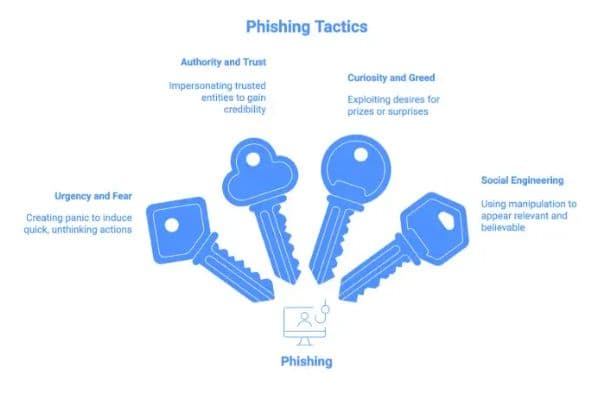
This is exactly how phishing works in the real world. Scammers don't always hack systems; they manipulate people. They create urgency, offer fake rewards, and trick you into sharing sensitive information like One-Time Passwords (OTPs).
Here are the key takeaways from this experience:
- Never share OTP codes with anyone, not even someone claiming to be a bank official.
- "Free gifts" and urgent phone calls are common scam tactics designed to lower your guard.
- Once a code is shared, your account can be accessed immediately.
Stay alert. One small mistake can lead to total loss.
Common Types of Phishing Attacks in Nigeria
The Opay trick is just one method. Attackers customize their scams based on what is currently popular in the country. Here are the most common phishing methods you will encounter in Nigeria:
1. The Bank Impersonation Call
You get a call from someone claiming to be customer care from Access Bank, Zenith Bank, or GTBank. They tell you your account has an issue, perhaps an unauthorized debit, or your BVN needs updating. They then ask you for your ATM card pin, full card number, or the OTP they just sent to your phone. Remember: No Nigerian bank will ever call you to ask for your PIN or OTP. If there is a genuine issue, they will tell you to visit the nearest branch.
2. Telecom and SIM Swap Tricks
Scammers often impersonate MTN, Airtel, or Glo representatives. They might call you to say your NIN is not properly linked and your line will be blocked in 24 hours. They send you a code and ask you to call it out. This code is often the authorization needed to initiate a SIM swap or access your mobile money wallet. Once they control your phone number, they control every bank account linked to it.
3. WhatsApp Hijacking
You receive a message from a friend or family member's WhatsApp account (which has already been hacked). They urgently need money for a medical emergency or ask you to join a highly profitable investment group. Sometimes, they just ask you to forward an SMS code you are about to receive. If you send that code, your WhatsApp account will also be hijacked, and they will use it to scam your contacts.
4. Facebook Marketplace Scams
If you sell items on Facebook or Jiji, scammers might contact you showing interest. They send a fake payment receipt that looks real, or they send a link claiming you need to log in to your bank through their "secure payment portal" to receive the funds. Once you enter your login details on that fake portal, they steal your money.
Real-Life Example: The Fake Email Threat
Phone calls aren't the only way scammers reach you. I opened my email and saw a message sitting quietly in my inbox:
"Urgent: Verify Your Account Immediately"
Something felt off, but I clicked anyway.
The email said I needed to confirm my details to avoid "account suspension." There was a link attached.
First red flag: the message had no clear context. I wasn't told why I was being contacted or which service it was about.
I kept reading.
The sender's name looked real, but the email address was strange—slightly misspelled. That was my second warning sign.
Then I noticed the file they attached (instead of proper instructions). It was named something like "update_final_final.doc". That didn't look professional at all.
Out of curiosity, I hovered over the link. The website address didn't match the official company site. It looked fake.
At that moment, everything made sense. Phishing doesn't always look dangerous. It looks normal—but slightly "off."
Here is what gave it away:
- No clear context in the message.
- Suspicious sender details.
- Fake-looking website link.
- Too much urgency without explanation.
I didn't click again. Because in phishing, the goal is simple: rush you into a mistake before you notice the signs.
How to Recognize a Phishing Attack Before You Click
The attackers rely on speed and panic. If you slow down and look closely, they almost always leave clues. Here is exactly what you should check:
- Check the Sender's Real Address: Do not just look at the display name. Tap or hover over the name to see the actual email address. An email from GTBank will end in @gtbank.com, not [email protected].
- Look for Bad Grammar and Spelling: While scammers are getting better, many phishing messages still contain strange phrasing, bad grammar, or misspelled words.
- Hover Before You Click: If there is a link, hover your mouse over it (or long-press on a phone) without clicking. A small box will pop up showing the actual destination URL. If the email says it goes to your bank but the link points to a strange address, it is a scam.
- Beware of the "Urgency" Trap: Scammers use words like "Immediate Action Required," "Account Suspended," or "Final Warning." They want you to panic and act without thinking. Real organizations will give you time to resolve issues.
- Unexpected Attachments: Never open unexpected attachments, especially from people you don't know. Files ending in .doc, .exe, or .zip can contain malware that steals information from your computer or phone.
Practical Steps to Protect Yourself
Knowing what phishing looks like is the first step, but you also need to set up defenses so that even if you make a mistake, the attackers cannot get in.
1. Turn on Two-Factor Authentication (2FA) Everywhere
Enable 2FA on your email, WhatsApp, Facebook, and banking apps. This means that even if a scammer gets your password, they still need a secondary code (usually sent via a dedicated authenticator app or SMS) to log in. And remember, never share that code!
2. Never Click Links in Unsolicited Messages
If you get an email or SMS saying your account has an issue, do not click the link provided. Instead, open your browser, type in the bank's official website yourself, or open your banking app directly to check.
3. Use Anti-Phishing Tools
If you are a professional or handle a lot of emails, you can use online tools to check if links or emails are safe. For example, you can use MxToolbox.com to verify email headers and domains to ensure they are coming from legitimate sources.
4. Slow Down
The biggest weapon you have against a scammer is time. When you receive an alarming call or message, take a deep breath. Tell the person on the phone, "I am busy right now, I will walk into the branch later," and hang up. A real customer care agent will not force you to stay on the line.
What to Do If You've Already Been Scammed in Nigeria
If you realize you have clicked a bad link, given out an OTP, or transferred money to a scammer, do not panic. Time is critical, and acting fast can sometimes reverse the damage.
1. Block Your Account Immediately
Most Nigerian banks have a USSD code you can dial from any phone to block your account or ATM card immediately (e.g., *737*51*74# for GTBank). Memorize your bank's emergency USSD code or write it down somewhere safe. If you don't know the code, transfer your remaining funds to a safe account if possible, or use your banking app to block your card and account.
2. Contact Your Bank
Call your bank's official customer care line or reach out to them on their verified X (formerly Twitter) handles. Report the fraudulent transaction. If you act quickly enough, the bank might be able to place a lien on the receiving account before the scammer withdraws the money.
3. Report the Incident to the Authorities
Many people skip this step thinking nothing will happen, but reporting helps law enforcement track down these networks. You can report phishing attempts and cyber fraud in Nigeria to:
- The Nigeria Police Force National Cybercrime Center (NPF-NCCC) via their portal at incb.npf.gov.ng or by calling +2349168343711.
- The Economic and Financial Crimes Commission (EFCC) by sending an email to [email protected].
- Use the Scamwatch Nigeria platform for reporting.
Phishing works because we are all busy, stressed, and easily distracted. By learning how these scammers operate in Nigeria, understanding their tricks, and taking simple protective steps, you can keep your money and your data safe.
Want to strengthen your team's cybersecurity awareness? Explore Elitech Hub's Corporate Cybersecurity Training.